
Application
Digital controller to automate industrial and process plants for general and more complex control tasks.
Fig. 1: TROVIS 6495-2 Industrial Controller
The TROVIS 6495-2 Industrial Controller is suitable for control
of continuous, on/off or pulsing final control elements (pneumatic actuators with i/p positioners, additional electric actuators, electric heating systems, refrigerating machines etc.)
Special features
• Simple menu structure with plain text display
• 4 analog inputs with filter, root extraction, function generation and measuring range monitoring
• 4 digital inputs for set point switchover, constant output
value, reversal of operating action, output tracking (DDC
backup), ramps etc
• 3 analog outputs
• 4 relay outputs for two on/off or three-step outputs or four
limit alarms
• 2 transistor outputs for fault alarms
• 1 transistor output for fault alarms
• Optional RS-232/USB and RS-485/USB interface boards
for SSP and Modbus RTU
• Degree of protection (front) IP 65
• Plug-on screw terminals
• Fixed set point control, one or two channels, internal/external switchover
• Follow-up control, one or two channels, internal/external
switchover
• Ratio control
• Cascade control, consisting of master and slave controller
• Limiting or override control
• Mixing control
• Linking of input variables (addition, subtraction, multiplication, division, mean value, minimum and maximum selection) for feedforward control or control with 1 to 4 input
variables (multi-component control)
• Operation with up to four internal set points and one external set point, either analog or via interface (SPC mode)
• Set point ramp and output ramp
• Split-range operation
• Control mode selection P/PI or PD/PID
• KP and TN adapted using the controlled variable, reference variable, manipulated variable or error signal
• Adjustable limitation of integral-action component
• Operating point preset by set point or digital input
• Control signal limitation (fixed or floating according to an
input variable)
• Operation with code number or key locking by a digital
inpu
Design and principle of operation
The TROVIS 6495-2 Industrial Controller has two independently working controllers with shared input and output
sections.
By setting the functions and parameters, the controller can be
adapted to a control task quickly. Preset basic configurations
for each control type minimize setup work for standard applications. The controller can be set up using the keys on the
housing or with the optional TROVIS-VIEW software without
requiring any additional accessories.
The controller settings are saved in a non-volatile memory,
even when the power supply fails. The two internal controllers
can be operated directly without switching. The plain-text display in English, German and French facilitates configuration
and parameterization.
Control modes
− Fixed set point control, one or two channels, internal/
external switchover
− Follow-up control, one or two channels, internal/external
switchover
− Ratio control (mixing control)
− Cascade control, consisting of master and slave controller
− Limiting or override control
Control
− Linking of input variables (addition, subtraction, multiplication, division, mean value, minimum and maximum selection) for feedforward control or control with one to four
input variables (multi-component control)
− Operation with up to four internal set points and one external set point, either analog or via interface (SPC mode)
− Set point ramp and output ramp
− Split-range operation
− Control mode selection P/PI or PD/PID
− KP and TN adapted using the controlled variable, reference variable, manipulated variable or error signal
− Adjustable limitation of integral-action component
− Operating point preset by set point or digital input
− Control signal limitation (fixed or floating according to an
input variable)
− Operation with code number or key locking by a digital
input
Inputs
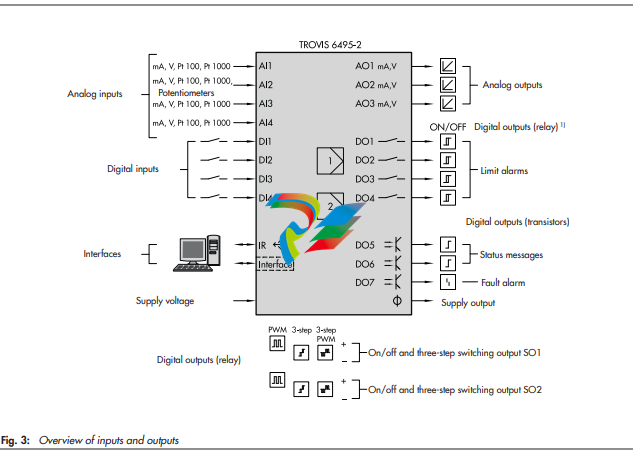
− 4 analog inputs (AI1 to AI4)
DIP switches at the side of the housing to select current or
resistance inputs. The signal type is set depending on the
configuration:
− 0/4 to 20 mA
− 0/2 to 10 V
− Pt 100 or Pt 1000 resistance thermometer
− Filter, root extraction, function generation and measuring range monitoring
− Input 2 additionally for potentiometers
− 4 digital inputs (DI1 to DI4)
The digital inputs are controlled either by a 24 V DC voltage signal or by the transmitter supply using a floating
contact. The digital outputs can only be controlled in
groups, with DI1 and DI2 being the first group and DI3
and DI4 being the second group.
Example: internal supply for digital inputs DI1 and DI2
and external supply for digital inputs DI3 and DI4.
− Set point switchover, constant output value, reversal of operating action, output tracking (DDC backup), ramps etc
The following functions that have been defined over the C
Controller, O Output and A General settings menus
can be assigned to a digital input (see the ‘Start-up and configuration’ section):
− Invert digital input
− Switchover between internal set points
− Switchover to external set point
− Opening/closing cascade
− Incremental/decremental set point change
− Set point increase/decrease by constant
− Start set point ramp
− Hold set point ramp
− Invert error signal
− Control mode selection P(D)/PI(D)
− Activate operating point for P/PD controller
− Manual/automatic switchover
− Hold output
− Activate output tracking
− Increase/decrease actual value
− Activate constant output value
− Start output ramp
− Limit output rate
− Lock control keys
Outputs
− 3 analog outputs (AO1 to AO3)
The signal type is set depending on the configuration.
− 0/4 to 20 mA
− 0/2 to 10 V
The outputs AO1 to AO3 can optionally be used for other
signals as well.
− 7 digital outputs (4 relay outputs and 3 transistor
outputs)
The relay outputs can be used as follows:
− SO1 and SO2 as on/off or three-step output
− DO1 to DO4 as limit output
− DO5 and DO6 (transistor output) for status messages
− DO7 (transistor output) for fault alarms
− 4 relay outputs
for two on/off or three-step outputs or four limit alarms
− 2 transistor outputs
for status messages
− 1 transistor output
for fault alarms
− 1 supply output
The supply output can be used to supply a voltage for up
to 4 two-wire transmitters and 4 digital inputs (21 V DC,
max. 90 mA).
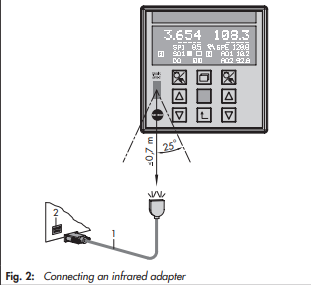
Infrared interface
Data are transmitted between the controller and the TROVISVIEW software over an infrared interface, by default
integrated into the controller and an infrared adapter (order
no. 8864-0900) connected to a computer (see the Mounting
and Operating Instructions EB 6495-2).
Communication interface
Optionally, the controller can be equipped with one of the following interface boards. The boards can also be retrofitted.
− RS-232/USB interface board
− One RS-232 interface with RJ-12 jack
− One USB interface with 5-pin mini-B port
The RS-232 data transfer uses an SSP or Modbus RTU
protocol. The memory pen-64 can be used with controllers
fitted with an RS-232/USB interface board to load data
configured in TROVIS-VIEW or transferred from another
controller.
− RS-485/USB interface board
− RS-485 interface (4 terminals) and
− USB interface (5-pin mini-B port)
Operation
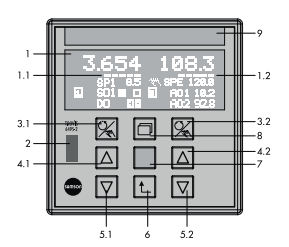
Display and operating controls
The device has nine operating keys, of which three are assigned to each controller channel. Depending on the selected
control type, one or two controllers are activated. The readings and controls of the controller [1] are located on the left
half of the device and on the right half for controller [2] (or
optionally vice versa). The row of keys in the middle is used
for both controllers.
Fig. 5: Display and operating controls
Operating level
After the supply voltage has been switched on, the controller
is in operating level.
The readings of the controlled variable, the reference variable
and the manipulated variable for each controller as well as a
bar graph for error are indicated on the display (1). Depending on the configuration, status alarms of the digital inputs
and outputs can be shown. The operating menu allows set
points to be switched and control parameters to be changed.
The two rows at the bottom of the display can be assigned as
desired. Numerous signals and interim outputs relating to the
internal controllers can be selected. For example, the values or
a bar graph of two outputs in split-range operation can be
displayed.
Configuration and parameterization
The controller is adapted to the selected application in the
configuration level. The configuration items are arranged in
hierarchical menus. All settings are displayed as plain text.
Operation using TROVIS-VIEW
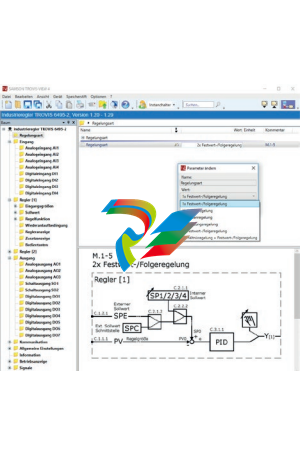
Controller settings (see Fig. 6)
Configuration settings and parameters can conveniently be
adjusted, documented and transmitted using the optional
TROVIS-VIEW software. Working in TROVIS-VIEW is similar
to working in Windows® Explorer. TROVIS-VIEW includes a
trend viewer for start-up that records the process data. Input
and output variables are displayed in a clear structure.
The TROVIS-VIEW software can be delivered on a CD-ROM,
if required. For further information on TROVIS-VIEW refer to
Data Sheet T 6661.
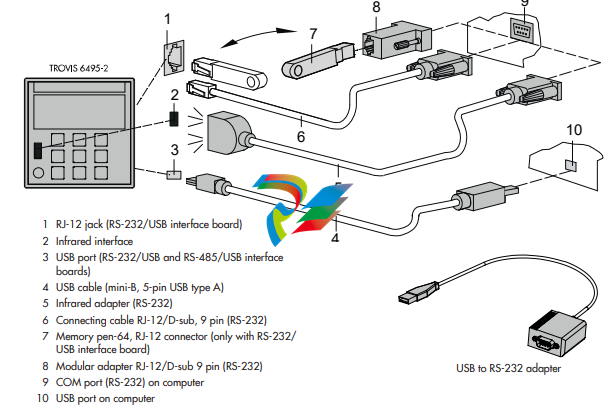
Data transmission (see Fig. 7)
Î Ordering numbers (see Table 3)
Data can be exchanged between the TROVIS-VIEW software
and the controller in various ways:
– Data transmission using the infrared interface (11) and an
infrared adapter (14)
– Data transmission using the optional interface board with
RS-232 and USB connections: data can be transmitted
over a conventional cable connection (either with a USB
cable (13) or a connecting cable (15)) or using a memory
pen (16).
– To integrate the controller into a communications network,
the controller can be fitted with an optional RS-485 interface board. The interface board has a USB connection
which can be used to transfer data using TROVIS-VIEW
Leave a comment
Your email address will not be published. Required fields are marked *